Digital tool · Instant download
You haven't overspent. Everything on your list is affordable. But rent lands three days before your pay does, and no amount of discipline fixes a calendar.
Put in your pay dates and your bill dates. This draws your balance day by day, names the day you run out, and finds the smallest change that clears it.
One file · Opens in any browser · Nothing you type ever leaves your device
What you actually get
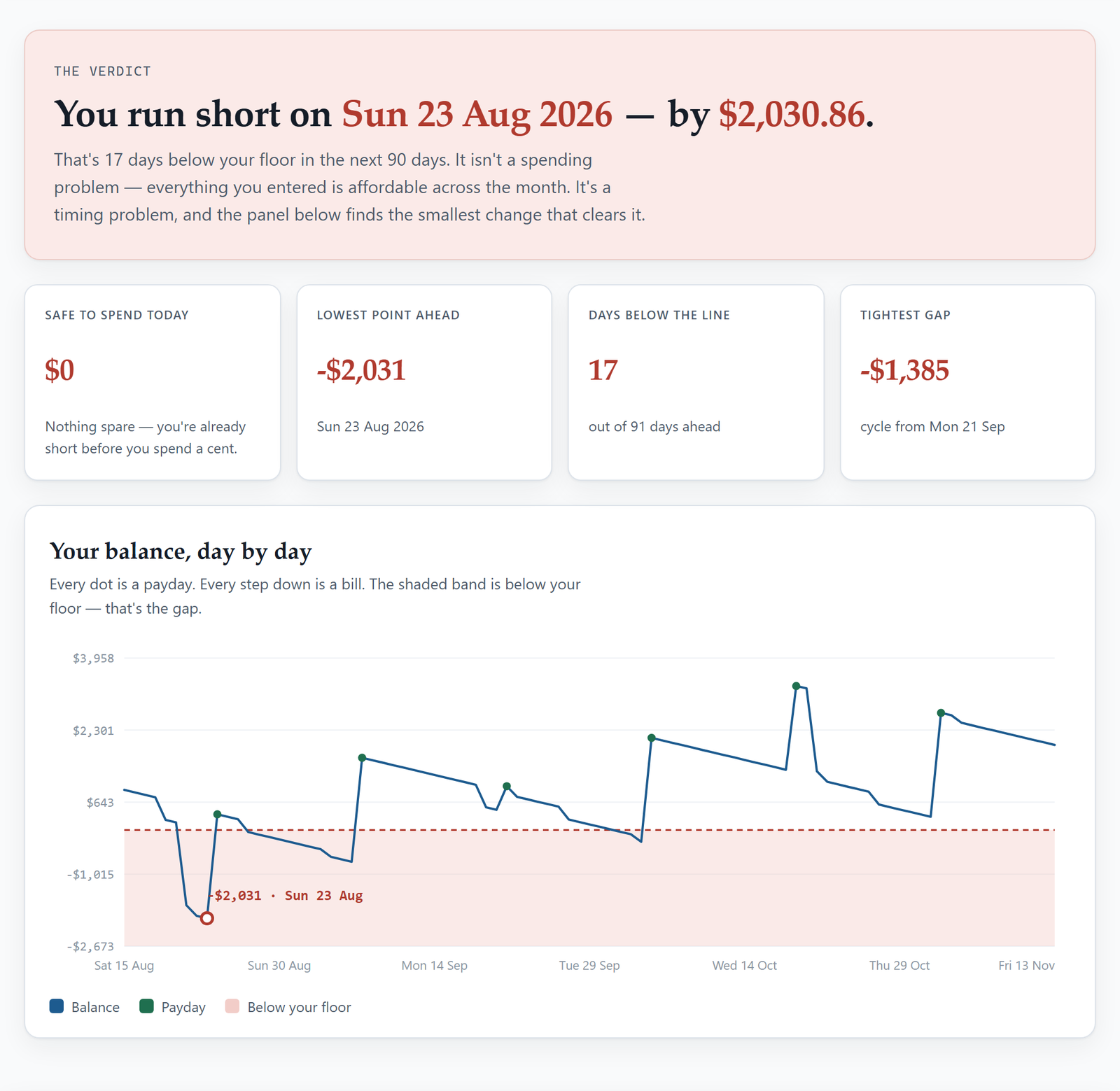
Not "money's tight this month". A date — Tuesday the 23rd — and the amount you'll be down by. Most people have never seen this, because nothing they've used carries a balance forward one day at a time.
One number: what you could spend right now and still never dip under your floor before the next payday. It counts every bill between here and there, which is exactly what your bank balance doesn't.
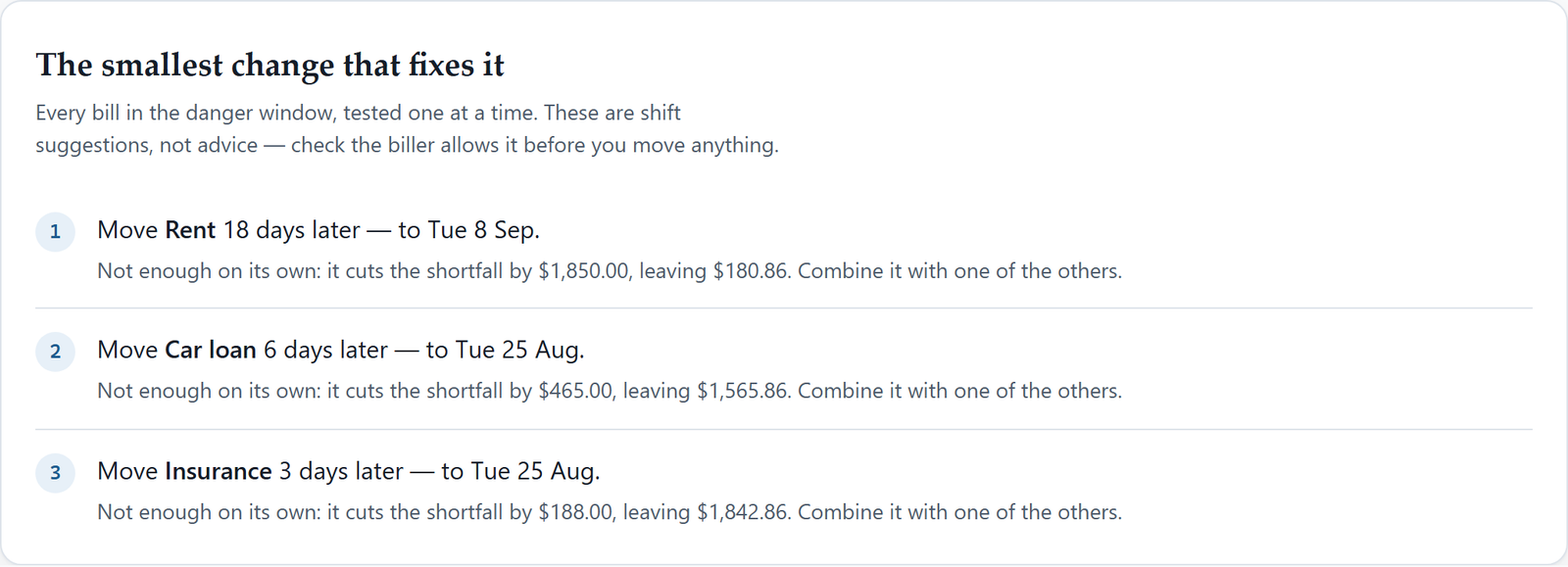
Every bill in the danger window gets tested on its own, shifted a day at a time, and the smallest move that clears the whole window comes back named. Usually one bill, a handful of days, one phone call.
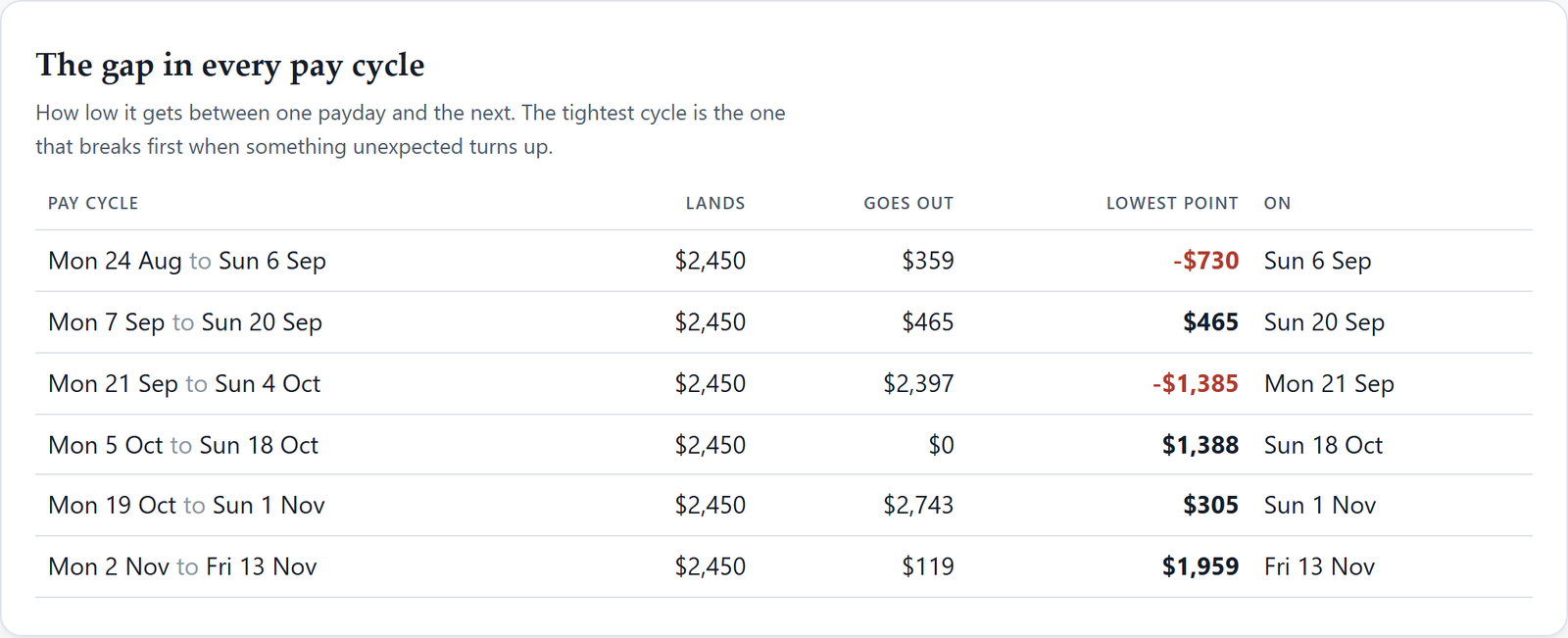
Cycle by cycle: what landed, what went out, how low it got. The tightest cycle is the one that breaks first when the car needs a tyre — so it's the one worth fixing before anything goes wrong.
The shift
A budget adds a column up and tells you you're fine. Your money doesn't arrive in a column — it arrives on days, and it leaves on other days. Here is the identical month, drawn both ways.
How a budget shows it
Every figure here is correct, and the conclusion is still wrong. A month that adds up tells you nothing about whether the money is there on the day the direct debit goes out — and that's the only question your bank actually asks.
How the money actually moves
Same money, drawn forward day by day. Rent clears before the pay lands, the line goes under, and it stays under for six days — collecting a dishonour fee on the way through. The fix here isn't spending less. It's moving one bill past the 14th.
Look inside
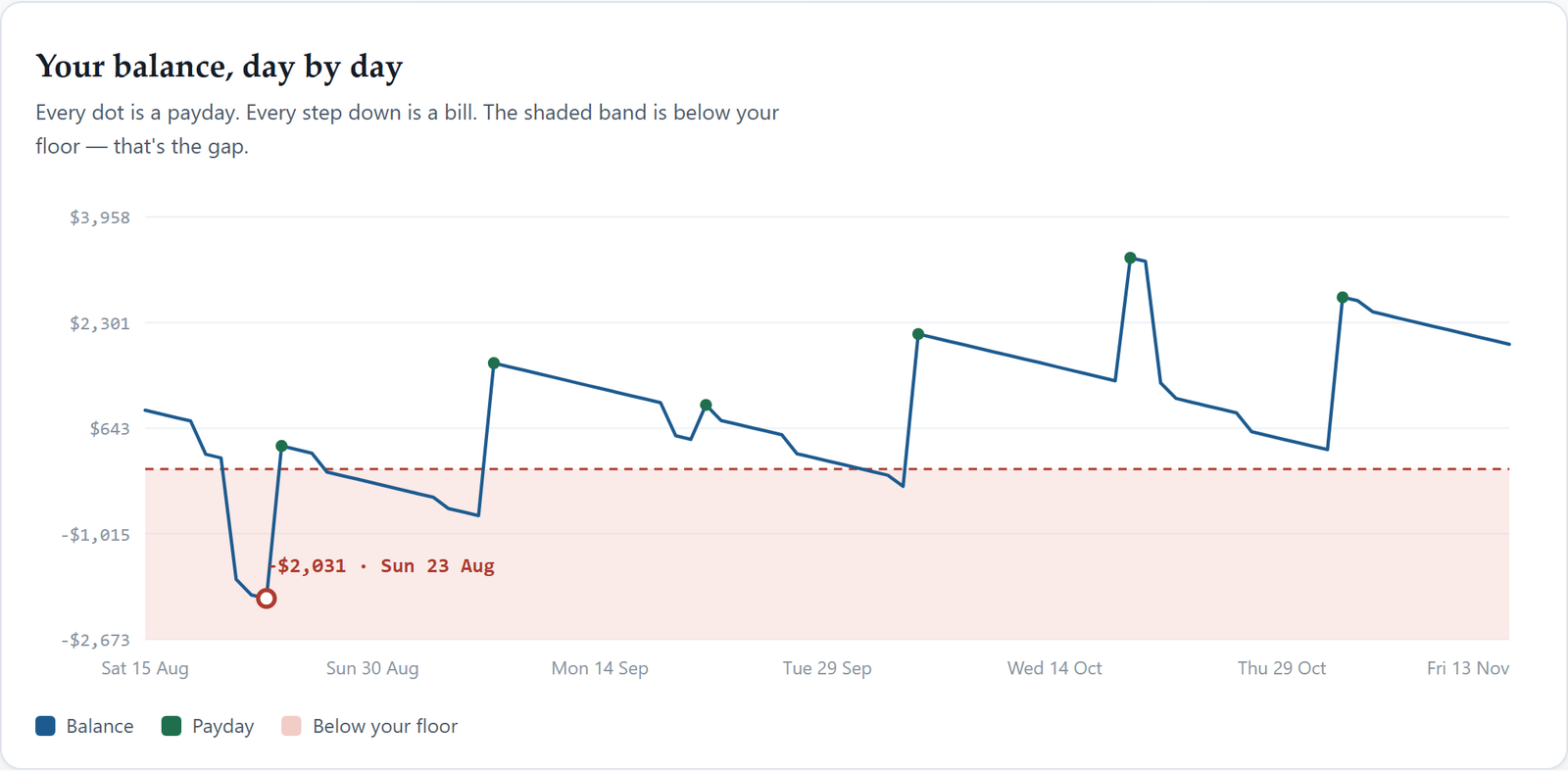
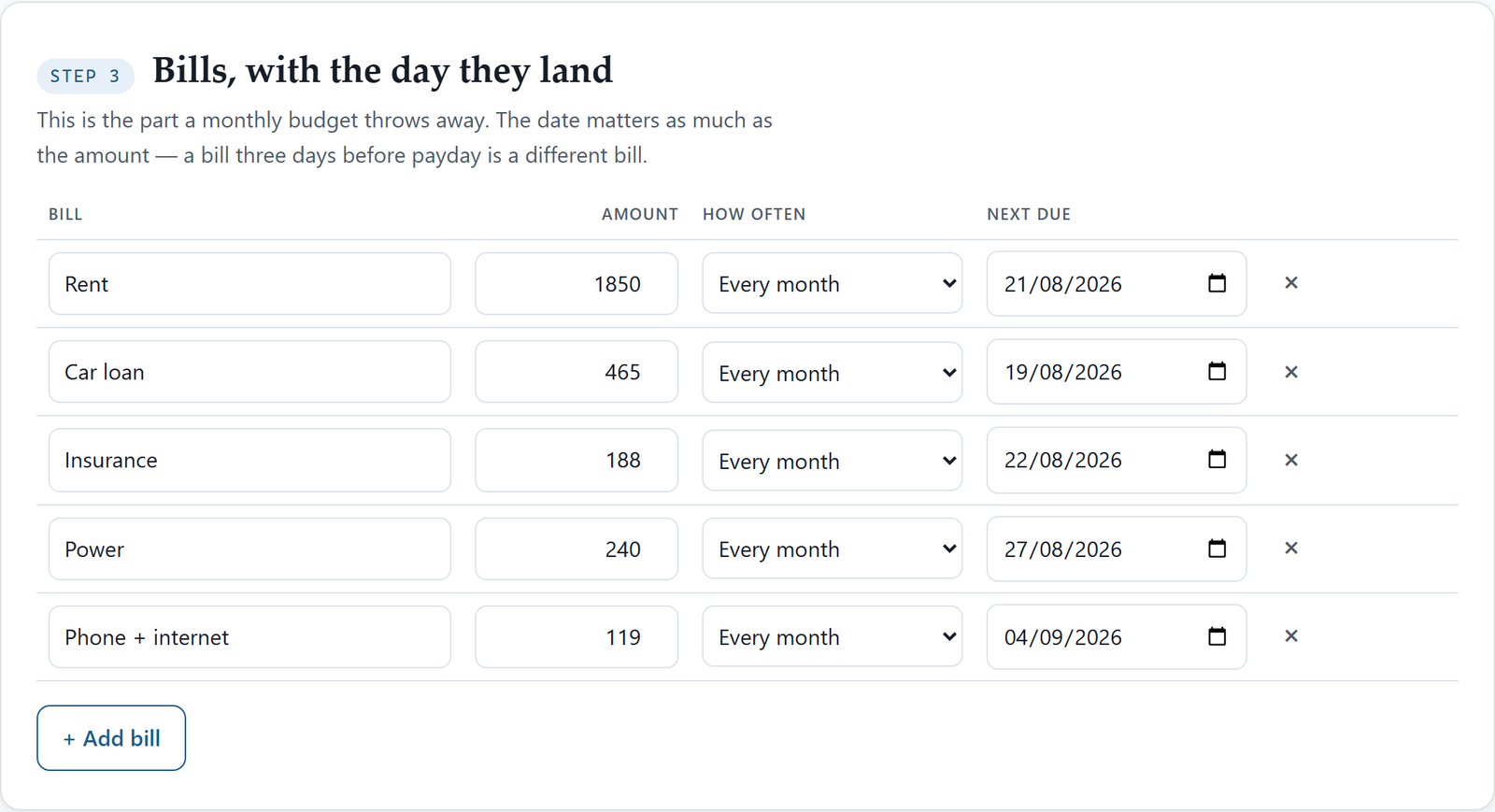
Every screenshot on this page is the product itself, running. Nothing here is a mock-up.
The companion workbook
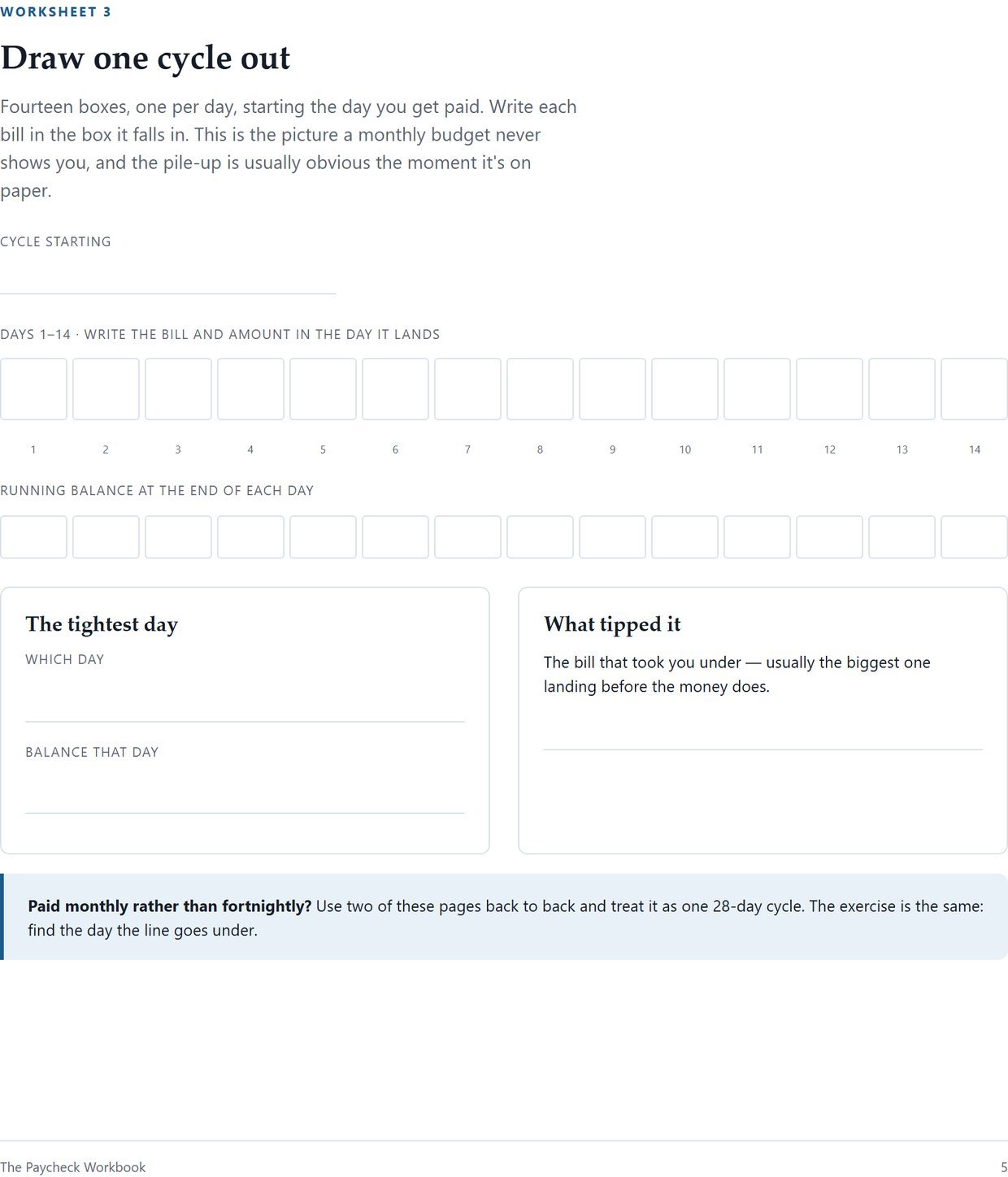
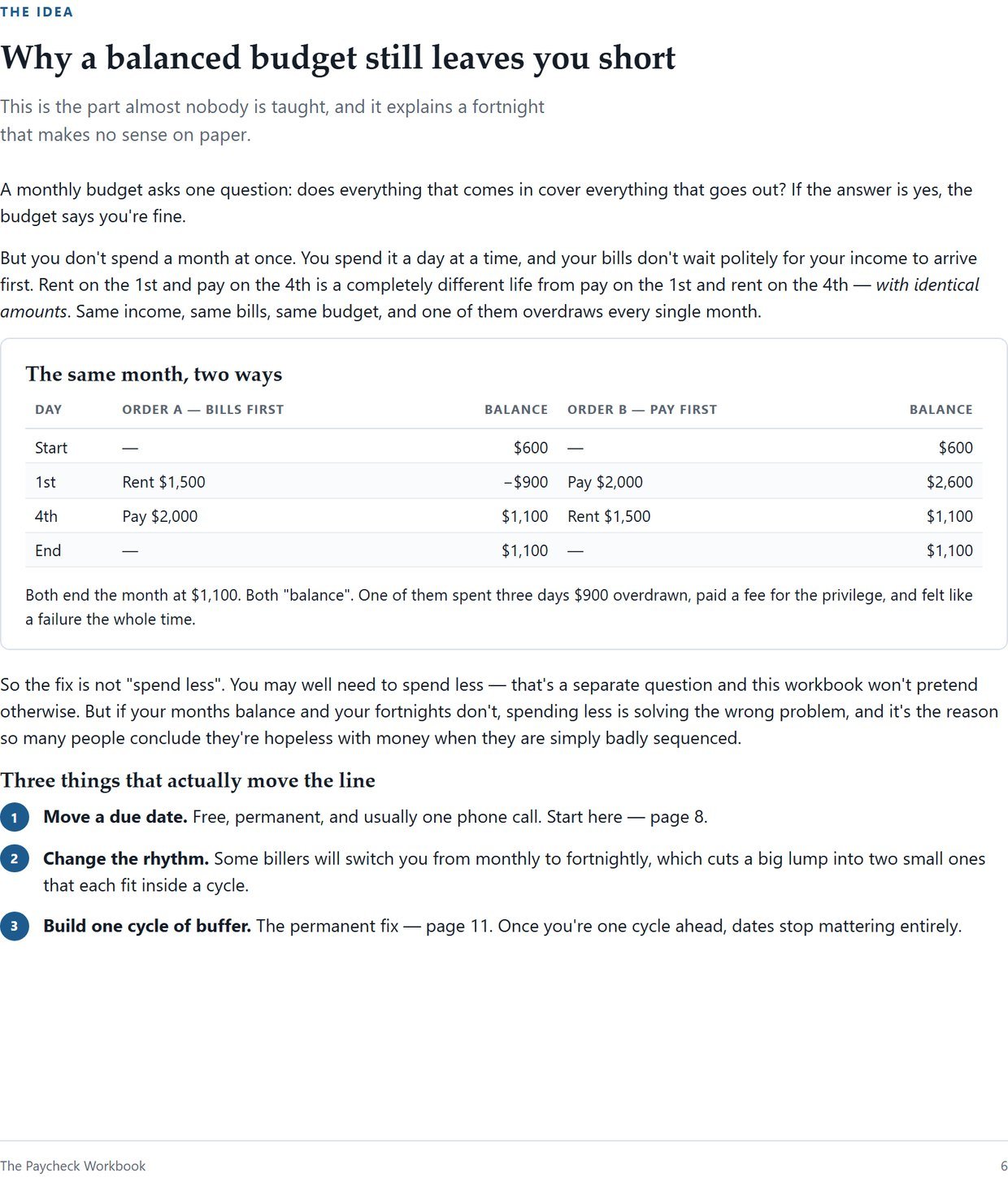
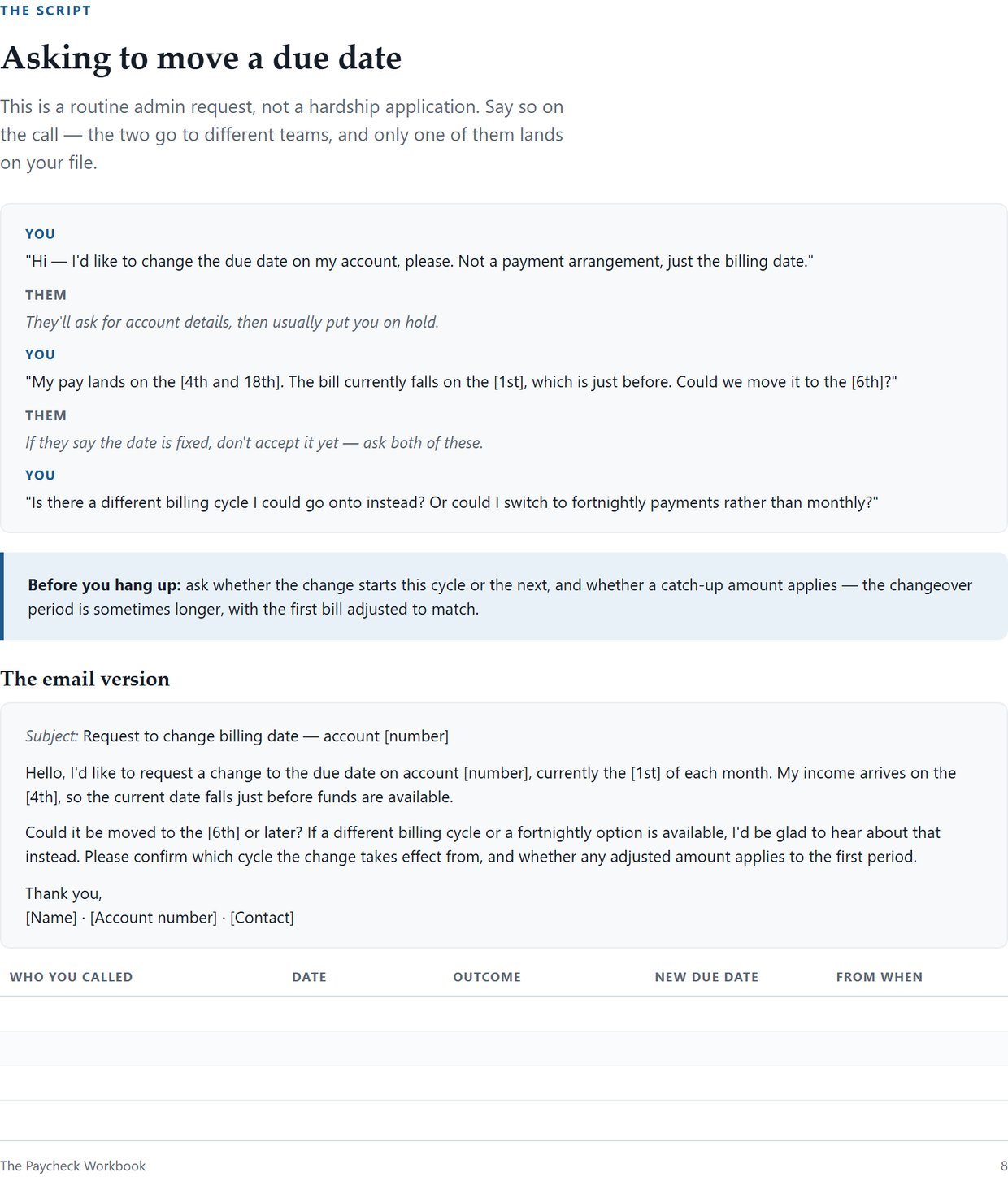
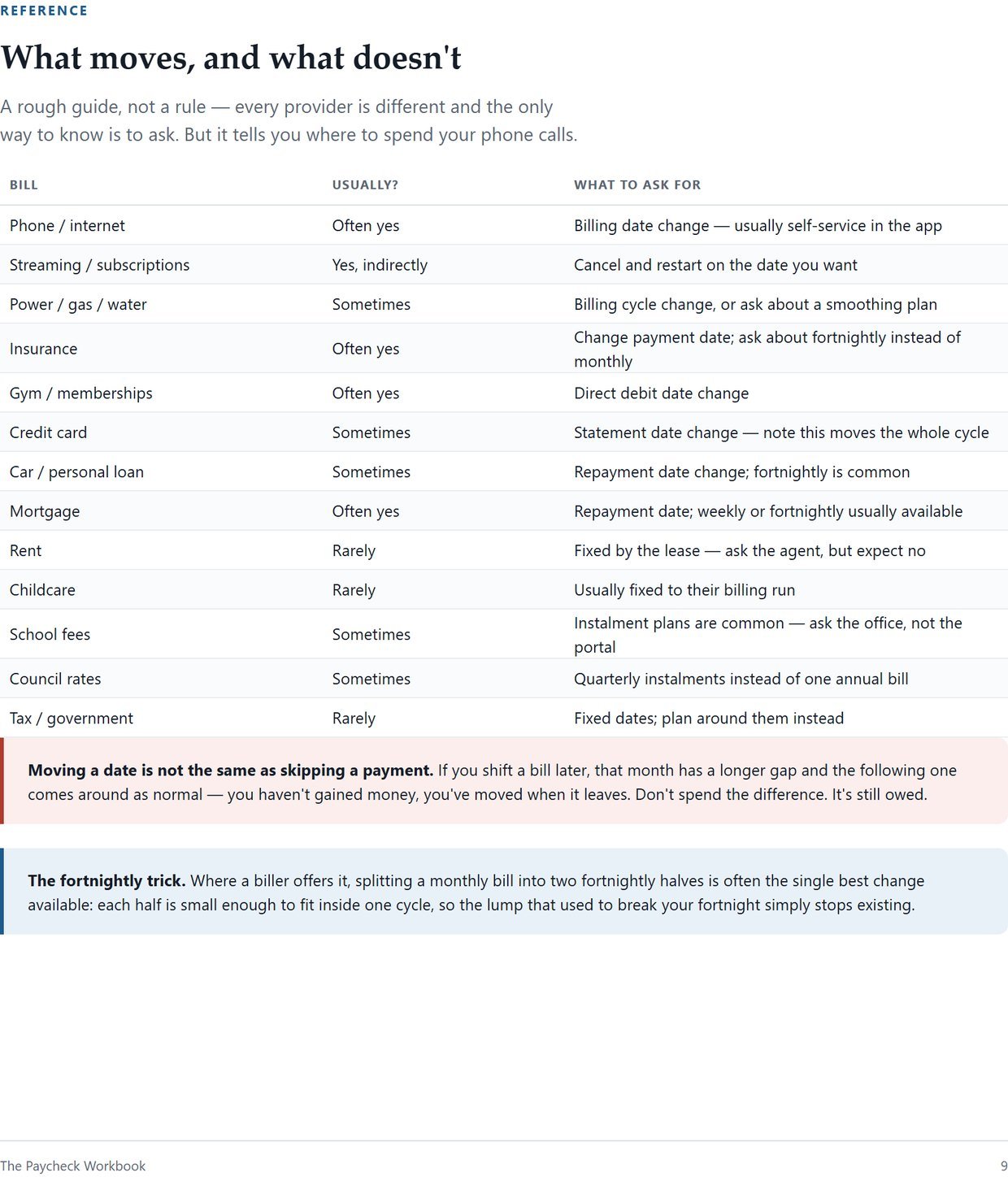
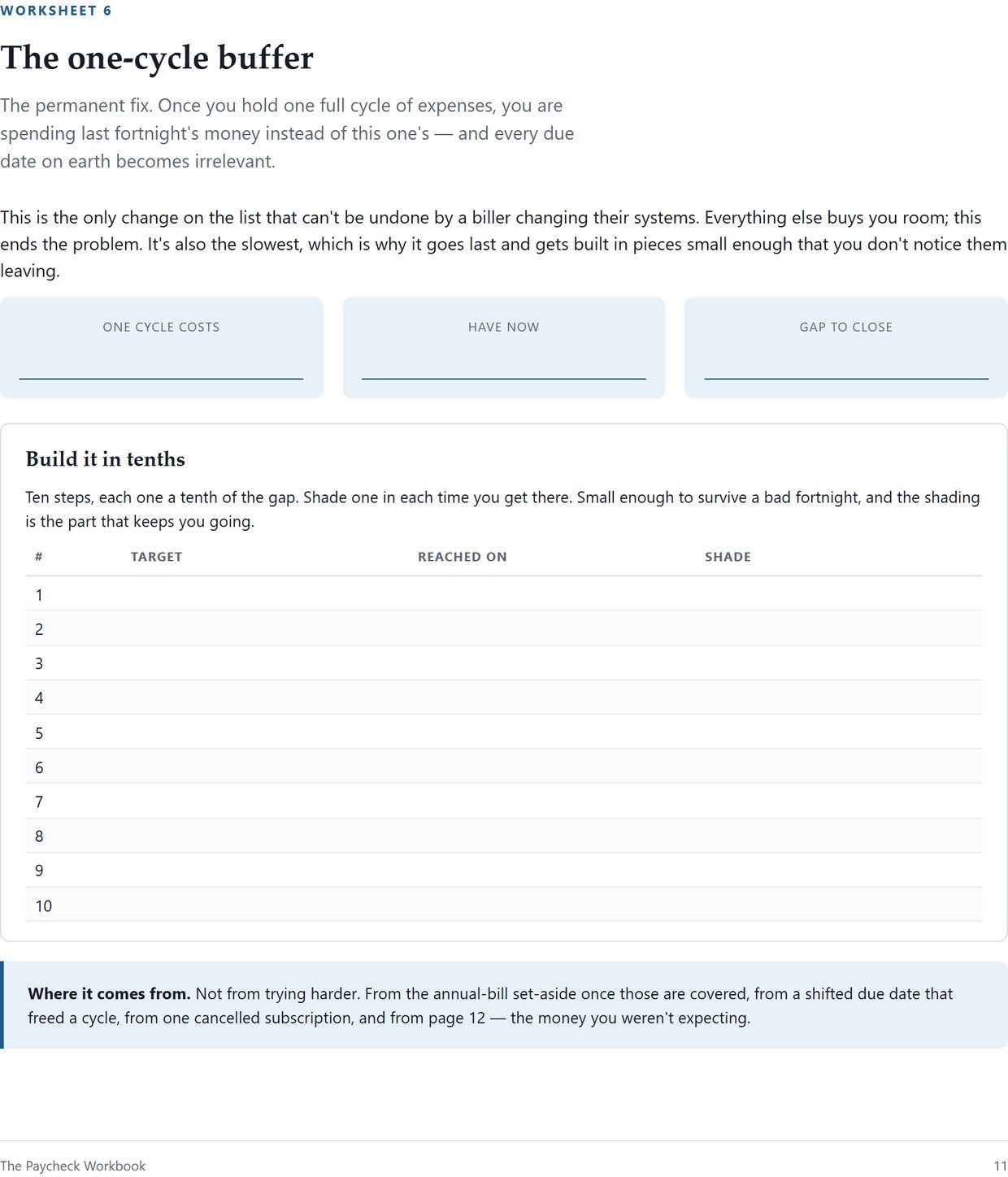
The tool does the arithmetic. The workbook does the part it can't — the phone call, the paperwork, and keeping it up for a year. Click any page to read it full size.
What each part does
The balance in the account your bills come out of, today's date, and how far ahead to look — 30, 60, 90 or 180 days.
Any number of sources. Weekly, every two weeks, every four weeks, twice a month, monthly, or a one-off. Put the date of the next one and it repeats from there.
Same shape as income. The due date is the whole mechanic here, not a note in a spare column. It saves as you type.
One weekly figure for groceries, fuel and the small stuff, spread evenly across every day. Plus an optional floor you'd rather not go under.
The day you run short and the amount — or confirmation you stay clear, and by how much. Stated in one line, in plain words.
Day by day across the whole horizon. Paydays marked, the band below your floor shaded, the lowest point labelled with its date.
Cycle by cycle: what landed, what went out, the lowest point, and the day it happened. The tightest one is the one to fix.
Each bill shifted one to twenty-one days, reporting the smallest move that clears the window. Bills that can't fix it alone say so, and say how much they do close.
A clean print layout, so the plan becomes a PDF or a sheet on the fridge. No app needed to keep using it.
How it works
You get one HTML file, straight after payment. Nothing to install, nothing to sign up for, and your download link stays live for 30 days so you can save it properly.
Pay dates and amounts, bills and their due days, one weekly spending figure. About ten minutes with a bank statement open beside you.
You'll get a date, an amount, and a suggested shift. If you have the workbook, the script for that phone call is on page 8.
Honestly compared
All three of these work. They're just answering different questions, and it's worth knowing which one you actually need.
| The Payday Gap | A budget spreadsheet | A budgeting app | |
|---|---|---|---|
| Tells you if the month balances | Yes | Yes | Yes |
| Tells you if you're short on the 14th | That's the whole tool | No | Rarely |
| Uses your bill due dates | The entire mechanic | Collects them, ignores them | Sometimes |
| Account needed | None | Google or Excel | Yes, often your bank login |
| Where your figures go | Stay on your device | Your cloud drive | Their server |
| Works offline | Yes, fully | No | No |
| Can you break it | No formulas to overwrite | One bad paste breaks it | Nothing to break |
| Cost | $22 once | $12–$35 once | Usually monthly |
| Yours next year | Same file, no new version | Often re-sold annually | Only while you keep paying |
Spreadsheets and apps are genuinely good at showing you what you spent. This does the thing they don't attempt — it looks forward, day by day, and tells you which day breaks.
Why this exists
I built this after watching someone go through the same fortnight over and over — comfortable on payday, scraping by day nine, hit with a dishonour fee on day ten. They had a budget. The budget was correct. It simply had nothing to say about when.
What eventually fixed it wasn't spending less. It was moving a car payment from the 2nd to the 16th, which took one phone call and cost nothing at all. That is an absurdly small fix for something that had felt like a personal failing for years, and it's the reason this is a tool about dates rather than another budget.
I've kept it deliberately small. One file, no account, nothing uploaded — partly because your bills are nobody else's business, and partly because I wanted something that still works in ten years, when whatever app you'd otherwise have used has been shut down or sold.
It won't suit everyone. If more is going out than coming in, no arrangement of dates fixes that, and both the tool and the workbook say so plainly rather than selling you a feeling.
— Thomas, Curious Digital Things
One problem. Two halves.
The tool finds the day and names the fix in one sitting. The workbook is how the fix actually happens — the script, the paperwork, and the year of keeping it up.
The forecaster on its own.
One-time. No subscription.
The answer, plus the year of acting on it.
Both files, one payment.
The printable companion on its own.
One-time. Print it as often as you like.
$29.95 for both is $22.00 and $7.95 added together. There's no discount dressed up as one, and no struck-through price we've never charged.
Two people, one household
Cash-flow timing is a household thing, and it goes much better as a conversation than as an accusation. Both files work on both computers, the workbook prints as many times as you like, and there's nothing in either one that says where it came from or what it cost.
If debt is part of the picture, The Debt-Free Date is the other half of the question. This one tells you whether you'll make it to Friday; that one tells you when the debt actually ends.
Before you buy
One file called the-payday-gap.html. You double-click it and it opens in your browser on Windows or Mac — Chrome, Edge, Firefox and Safari are all fine. There's nothing to install and nothing to sign into. It's built to be used on a computer. If you also buy the workbook, that's a separate 20-page A4 PDF you print.
No, and it can't. The file makes no network requests of any kind — you can disconnect from the internet entirely and it behaves exactly the same. You type your figures in, they're saved in that browser on that computer, and nothing is uploaded anywhere. There's no account for anyone to breach.
No. It isn't a spreadsheet, so there's no "make a copy" step before you can see anything, and no formulas to accidentally paste over.
We don't claim it will. It's built for a computer, where there's room for a chart and a table side by side and where opening a downloaded file is straightforward. If a computer isn't an option for you, this isn't the right purchase, and we'd rather say that here than after you've paid.
Exactly as accurate as the figures you type. It's a projection, not a promise. It can't know about variable bills — a power bill that lands higher than last quarter will move the answer — and it says so on screen rather than quietly pretending otherwise. It also takes bills out before income on a day where both land, which is the safe assumption rather than always what your bank does.
Some can't — rent and most government bills are fixed. The tool tests every bill you've entered, so if nothing can fix it on its own it tells you that rather than inventing a suggestion. The workbook has a reference table of thirteen common bills covering which usually shift, which rarely do, and what to ask for instead.
No, and it says so inside the tool as well. It's arithmetic performed on numbers you type in. It doesn't know your income, your circumstances or your goals. If money is genuinely unaffordable rather than just badly timed, no tool fixes that — the workbook points to free financial counselling services, which will help you far more than this will.
Not yet. This has just been released and nobody has used it long enough to have an opinion worth publishing. Rather than write filler, we've left that section honest — and there's a 30-day money-back guarantee, which is the part that actually protects you.
Your download link stays live for 30 days after purchase. Save the files somewhere sensible in that window and they're yours permanently — no expiry on the files themselves, and no annual version to buy again.
There's a 30-day money-back guarantee. Email support@curiousdigitalthings.store and you'll get a refund, no argument. Full details are on the refund policy page.
Ten minutes with a bank statement, and you'll have the date, the amount, and the one change that clears it. It's almost never the change you were dreading.
Instant download · 30-day money-back guarantee · works offline forever
 Curious Digital Things